MinerStat: Your Mining Operation’s 24/7 Co-Pilot
Alright, let’s talk straight. You’ve got your rigs running, the fans are humming, but are you really in control? Constantly worrying about crashes, falling hash rates, or missing the most profitable coin is a drain on your focus and your bottom line. You need a system that works as hard as your hardware. You need MinerStat. This isn’t just a monitoring tool; it’s a full-blown command center for your mining empire. Think of it as the all-seeing eye and the quick-reacting hand that never sleeps, ensuring every piece of your hardware is earning to its absolute potential. And right here at BestFinSoft, we’re providing the trusted, high-speed gateway to get this powerful software on your desktop, where it belongs.
What is MinerStat? The Cloud-Based Brain for Your Mining Farm.
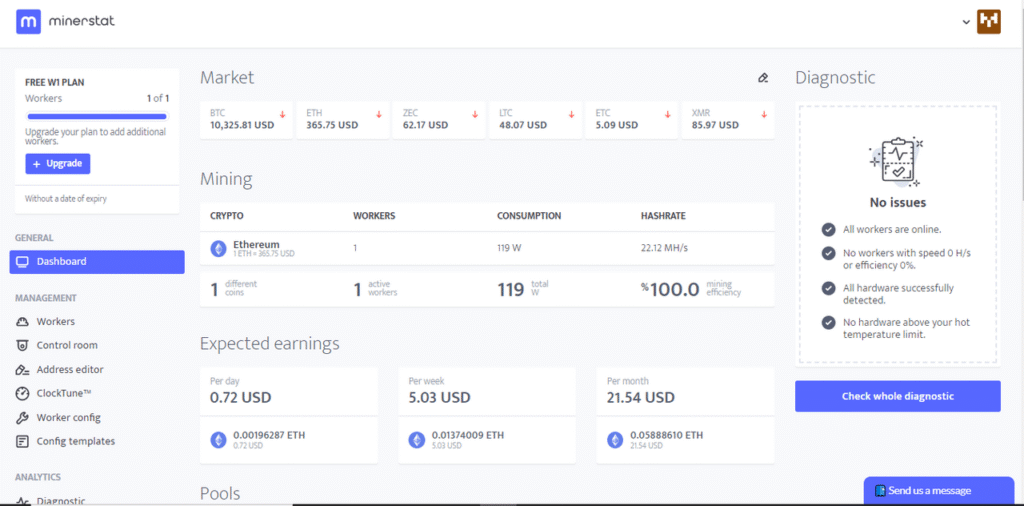
MinerStat is a sophisticated, cloud-based monitoring and management platform designed for miners who are serious about their business. Unlike a full operating system you boot from, MinerStat is a powerful agent you install on your existing Windows, Mac, or Linux system. This agent feeds real-time data from your rigs-every GPU, every ASIC, every temperature sensor-straight to your personalized web dashboard. The result? You get a single, unified view of your entire operation from any web browser, anywhere in the world. It’s the ultimate tool for turning a scattered collection of machines into a cohesive, profit-optimized unit.
If You’re Not Monitoring, You’re Just Guessing (And Losing Money).
Running your miners blind is like driving a racecar with a blindfold on. You might feel the speed, but you have no idea when you’re about to crash. A single crashed GPU can cost you days of earnings before you even notice. Manually checking profitability across a dozen different coins is a full-time job. And without detailed performance logs, how can you possibly optimize your overclocks for maximum efficiency? This “set it and forget it” mentality might work for a hobby, but for a serious operation, it’s a recipe for lost revenue. MinerStat pulls back the curtain and gives you the data and control you need to stop guessing and start knowing.
The BestFinSoft Guarantee: Power Without the Peril.
Downloading and installing a system-level agent requires trust. You’re letting this software deep into your machine, and you need to be 100% sure it’s clean.
Virus-Free, Guaranteed: We take that trust seriously. Every installer on BestFinSoft is rigorously scanned and verified to be completely free of malware, viruses, or any hidden payloads. You get the genuine MinerStat agent, safe and secure.
Download in a Flash, Not a Crawl: We know the crypto markets move fast. Our high-speed servers ensure you get the MinerStat installer instantly, so you can go from download to deployment without wasting a single hash.
Always the Latest Build: The MinerStat team is constantly innovating. We provide the most current, stable version of the software, ensuring you have access to the latest features, performance enhancements, and compatibility updates from day one.
Unpacking the Toolkit: MinerStat Features That Give You the Edge.
This is where MinerStat proves its worth. It’s packed with pro-level features that separate the amateurs from the pros.
The Unified Dashboard: Your mission control. See the status of every worker at a glance: total hash rate, active shares, power consumption, GPU temperatures, and overall efficiency. Get a real-time health check of your entire farm without leaving your chair.
Profit Switching Algorithm: This is the killer feature. MinerStat can automatically analyze the market and switch your miners to the most profitable coin for your specific hardware. It’s like having a dedicated financial analyst working for your rigs 24/7.
Powerful Remote Management: Take control from anywhere. Update miner software, change pool settings, adjust overclocks, or reboot a frozen rig-all remotely through the web interface. No more frantic trips to your mining shed.
The Unbeatable Watchdog: Your automated pit crew. MinerStat’s watchdog constantly monitors your rigs. If it detects a crash, a frozen GPU, or a significant drop in hash rate, it automatically restarts the miner or reboots the entire system, minimizing downtime and saving you money.
Advanced Notifications: Stay informed, not overwhelmed. Get instant alerts via Telegram, Discord, Slack, or email for critical events like rig failures, temperature spikes, or connectivity issues. You’ll know the second something needs your attention.
In-Depth Benchmarking and Reporting: Stop flying blind. MinerStat automatically benchmarks your hardware across different algorithms and provides detailed profitability reports. This data is gold for fine-tuning your operation and making informed decisions about your hardware investments.
Multi-Platform Power: Whether your rigs run on Windows, Linux, or even a Mac, MinerStat has an agent for it. This allows you to manage a diverse fleet of machines from a single, cohesive platform.
Gearing Up: What You Need to Get Started.
Getting MinerStat up and running is a straightforward process. Here’s your checklist.
Your Mining Rigs: Any computer with a compatible OS (Windows, Linux, Mac) and one or more GPUs or ASICs.
A MinerStat Account: You’ll need to sign up for an account on the MinerStat website. This is free for a limited number of workers and gives you access to the cloud dashboard.
Basic Technical Know-How: You need to be comfortable downloading and installing the MinerStat agent software on each of your machines. The process is well-documented and user-friendly.
Your Mining Wallets and Pool Info: Have your cryptocurrency wallet addresses and the connection details for your preferred mining pools ready to input into the dashboard.
Your Quick-Start Guide to Smarter Mining.
Ready to put your mining on autopilot? Let’s get you set up.
Step 1: Grab the Agent. You’re in the right place. Download the MinerStat agent for your operating system (Windows or Mac) from BestFinSoft. It’s safe and fast.
Step 2: Install and Register. Run the installer on each of your mining rigs. During the setup, you will be prompted to enter a unique code that links the agent to your MinerStat online account. This is how your rigs “phone home.”
Step 3: Configure Your Dashboard. Log into your MinerStat web dashboard. You’ll see your connected workers appear. Now, you can set up your mining “plans”-which define the pool, wallet, and miner software to use. Apply these plans to your workers.
Step 4: Activate the Watchdog. Don’t forget to enable the watchdog feature for each worker. This is your key to hands-off stability. Sit back and watch as your operation runs with a new level of efficiency and reliability.