PiMP OS: The Original Mining OS That Stays in the Game So You Can Cash In.
Let’s get one thing straight right out of the gate. In the wild world of crypto mining, flashy new tools come and go. But when your money is on the line, you don’t need flash-you need a rock-solid foundation. You need an operating system that won’t flinch, crash, or bail on you when the going gets tough. You need PiMP OS (Portable Instant Mining Platform). This is the original, the OG of Linux-based mining operating systems, the one that set the standard back in 2012 and has been refining the art of stable mining ever since . While others are trying to reinvent the wheel, PiMP OS is the reliable engine that just keeps on humming, turning electricity into profit, day in and day out. This isn’t just software; it’s your mining farm’s unwavering core. And right here at BestFinSoft, we’ve got the genuine article ready for a high-speed, secure download to get you mining on a legendary platform.
What is PiMP OS? Your Mining Rig’s Unshakable Foundation.
Think of PiMP OS as the ultimate pit crew and command center for your mining hardware, all rolled into one. It’s a lean, mean, Linux-based operating system that you boot directly from a USB drive or SSD, completely bypassing the bloat and instability of a general-purpose OS like Windows. PiMP is built from the ground up for a single, glorious purpose: to mine cryptocurrency with maximum efficiency and legendary stability . Since 2012, it has been the trusted choice for everyone from hobbyists firing up their first rig to professional farmers managing massive operations . It comes pre-loaded with all the miners, drivers, and tools you need, meaning you spend less time configuring and more time collecting your coins.
Why Mining on Anything Else is a Constant Uphill Battle.
Trying to manage a mining operation on a standard OS is a full-time job you never signed up for. Driver conflicts, random Windows updates, crashing miners, and the sheer headache of remote management will suck up your time and kill your profitability. A single crashed GPU that goes unnoticed for a few hours is money straight down the drain. This constant babysitting is a drain on your sanity and your bottom line. PiMP OS automates the grind. Its legendary stability is no joke-users have reported rigs with over 250 days of constant uptime . That’s not luck; that’s engineering. It’s the peace of mind that comes from knowing your operation is running like a well-oiled machine, even while you’re asleep.
The BestFinSoft Guarantee: Get the Legend, Without the Risk.
Flashing a new OS is a big step, and you absolutely must trust the source. A corrupted file can mean a bricked rig or, worse, a hidden backdoor siphoning off your hard-earned hashes.
Certified Clean and Authentic: We provide the pure, unmodified PiMP OS image straight from the official source. Our files are put through rigorous virus and malware scans. You get the real deal, exactly as the developers intended, with no funny business.
Download at Ludicrous Speed: We know downtime is lost revenue. Our high-speed servers ensure you get the PiMP OS image file in a flash, so you can move from download to deployment without any annoying delays.
We Serve the Proven Builds: PiMP OS is built on stability, not chasing every new trend. We provide the most recent, proven stable release, giving you a platform you can count on for the long haul.
Under the Hood: PiMP OS Features That Get the Job Done.
This is where PiMP OS separates the professionals from the amateurs. It’s packed with time-tested tools that deliver real-world results.
All-in-One Bootable Platform: Say goodbye to OS bloat. PiMP runs directly from your drive, offering a clean, dedicated environment for mining. It supports a massive range of algorithms, ready to mine whatever coin is most profitable for your hardware .
The Famous pimp –test Command: This is troubleshooting genius. A simple command lets you test your entire setup-it shows the startup command, starts the miner, and attaches to the screen so you can see exactly what’s happening in real-time. It cuts down debugging from hours to seconds .
Streamlined Managed Mining Profiles: PiMP uses simple, powerful configuration files to manage your mining operations. Set up your pools, wallets, and miner settings once, and apply them across your entire farm with ease .
Unmatched Hardware and Driver Support: Whether you’re running AMD or NVIDIA cards, PiMP OS has you covered with optimized drivers and kernels. The development team has consistently been at the forefront, integrating support for new hardware like the RX 5xx series and optimizing for performance .
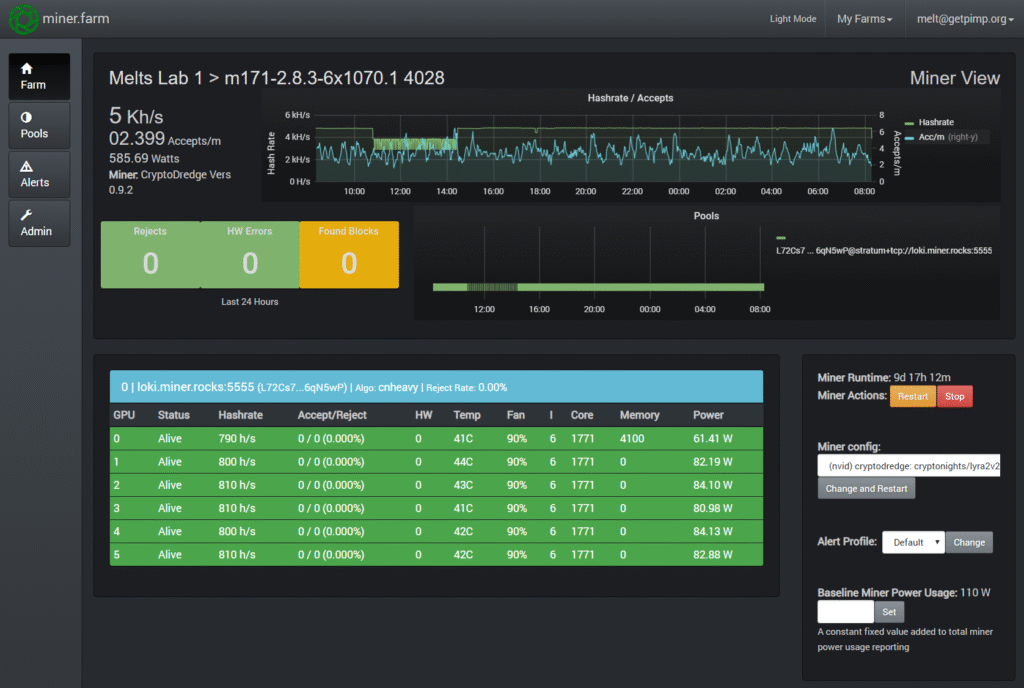
Robust Remote Management & Monitoring: Through tools like the helpme command and integration with services like Miner.farm, you get deep insights into your rig’s health and performance, allowing for true remote management .
A Decade of Stability and Community: This is PiMP’s killer feature. With over 200,000 downloads and a history stretching back to 2012, you’re not just using software; you’re tapping into a vast knowledge base and a dedicated community that has seen it all .
Professional-Grade Reliability: PiMP OS was developed with a professional testing and support team from the very beginning, a claim many competitors can’t make. This focus on quality results in the incredible uptime miners rely on .
Gearing Up: What You Need to Go Pro with PiMP.
Getting started with PiMP is a straightforward process. Here is your checklist.
Your Mining Rig Hardware: Any standard mining rig with a motherboard, CPU, RAM, and GPUs.
A Bootable USB Drive or SSD: You will need a USB drive (8GB or larger) or, for a much more reliable and recommended setup, a small SSD to host the PiMP OS.
A Basic Understanding of Mining: You should be familiar with core concepts like wallets, mining pools, and how cryptocurrency mining works.
Your Pool and Wallet Information: Have the connection details for your preferred mining pools and your cryptocurrency wallet addresses ready for the configuration.
Your Quick-Start Guide to Rock-Solid Mining.
Ready to leave mining headaches behind? Here’s how to get PiMP OS running on your rig.
Step 1: Download the Image. You’re in the right place. Download the latest stable PiMP OS image file from BestFinSoft. It’s secure, verified, and fast.
Step 2: Create Your Bootable Drive. Use a free tool like Rufus (for Windows) or BalenaEtcher (for Windows/Mac) to flash the downloaded .img file onto your USB drive or SSD.
Step 3: Boot and Configure. Plug the drive into your mining rig. Power it on and enter your motherboard’s BIOS/UEFI (usually by pressing Delete or F2). Set the boot order to start from your USB or SSD. Save and exit. The rig will boot directly into PiMP OS.
Step 4: Set Up Your Mining Details. Follow the on-screen instructions or use the provided documentation to edit the configuration files with your specific pool and wallet information. This is where you tell the system what to mine and where to send your earnings.
Step 5: Let It Run. Once configured, PiMP OS will take over. Watch as it initializes your miners and starts hashing away. You’ve just deployed one of the most stable mining platforms in existence.
Stop Fighting Your Software and Start Running a Business.
Your time and your hardware’s uptime are your most valuable assets in mining. Stop wasting them on constant maintenance, troubleshooting, and worrying. PiMP OS from BestFinSoft is the investment in stability and peace of mind that pays for itself by maximizing your uptime and eliminating the daily drama of mining management.