Hive OS: Stop Babysitting Your Rigs
Let’s face it. Managing a crypto mining operation, whether it’s two rigs or two hundred, is a massive headache. Constantly running between machines, dealing with crashed miners, updating software, and staring at a dozen different command windows is a full-time job you never signed up for. What if you could just… make it all work? Seamlessly, reliably, and from anywhere? Welcome to Hive OS. This isn’t just software; it’s the central nervous system for your entire mining operation. It’s the command center that turns a chaotic pile of hardware into a smooth, efficient, profit-generating machine. And right here at BestFinSoft, we’re giving you the direct, secure, and high-speed download to get this game-changing platform onto your bootable USB, ready for action.
What is Hive OS? Your Mining Farm’s New Brain.
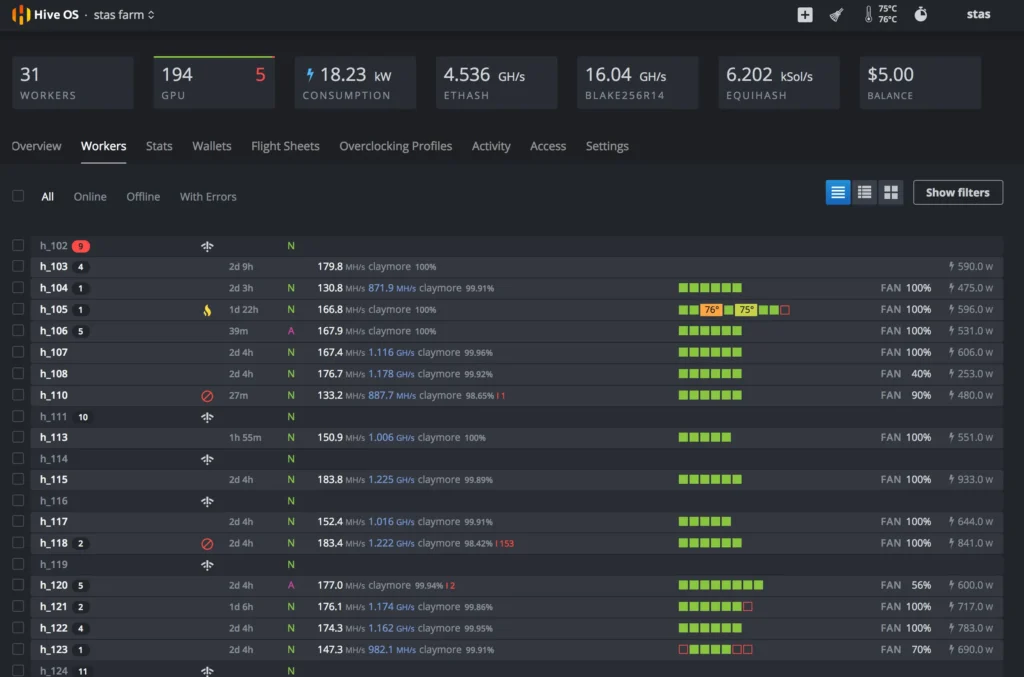
Think of Hive OS as the mission control for your crypto mine. It’s a Linux-based operating system built from the ground up for one purpose: to make mining stupidly simple and incredibly efficient. Instead of installing Windows on every rig and managing them individually, you flash Hive OS onto a USB drive (or install it on your SSD), boot your rig from it, and voila! That rig is now a node in your personal, cloud-managed hive. Through a single, sleek web dashboard or a mobile app, you can see the status of every single piece of hardware you own, no matter where you are in the world. It’s the power to oversee your entire operation without ever getting out of your chair.
The Old Way is Killing Your Profits and Your Sanity.
Manually checking on each rig is a total time-suck. A GPU fails in the middle of the night? You won’t know until morning, and that’s hours of lost income. A miner crashes and your hash rate drops to zero? You’re burning electricity for nothing. Manually tweaking overclocks on 10 different machines? Forget about it. This “old school” approach is not scalable, it’s not efficient, and it’s definitely not smart. You’re leaving money on the table and sacrificing your free time. Hive OS automates all of this, acting as your 24/7 dedicated IT team that never sleeps.
The BestFinSoft Advantage: Get the Real Deal, No Compromises.
Flashing an OS is a serious step, and you need to trust the source completely. A corrupted file could mean a bricked rig or, even worse, a hidden backdoor.
100% Clean Build, Guaranteed: We provide the authentic, unmodified Hive OS image directly from the official source. Our files are rigorously scanned to be completely free of viruses, malware, or any unwanted modifications. Your operation’s security is our top priority.
Download at Warp Speed: We know you need to get your farm online and optimized ASAP. Our high-speed servers ensure you get the Hive OS image file instantly, so you can move from download to deployment without any frustrating delays.
Always the Latest and Greatest: The Hive OS team is constantly rolling out updates with new features, stability fixes, and support for the latest hardware. We guarantee you’re getting the most current, stable version available, ensuring maximum compatibility and performance from day one.
Cracking Open the Hive: Features That Will Blow Your Mind.
This is where Hive OS moves from a convenience to a necessity. It’s packed with tools that give you a professional edge.
One Dashboard to Rule Them All: See the status of your entire farm in one glance. Total hash rate, active/inactive workers, power consumption, temperature averages, and profitability estimates are all front and center.
Remote Control at Your Fingertips: Change mining pools, update miners, adjust overclocks, or reboot a rig on the other side of the city-all from your laptop or phone. No more frantic phone calls to a buddy to physically press a button.
The Magic of Flight Sheets: This is Hive OS’s killer feature. A flight sheet is a pre-configured set of instructions: which coin to mine, which pool to use, and which miner software (like XMRig, TRex, etc.) to run. Apply a flight sheet to one rig or a hundred with two clicks. Switching what you mine has never been easier.
Profit-Switching Autopilot (With Hiveon Pool): Integrate with the Hiveon pool and let the system automatically switch your rigs to the most profitable coin based on real-time market conditions. It’s like having a full-time trader working for your farm.
Unmatched Watchdog System: This is your automated guardian. The watchdog constantly monitors each rig. If a GPU hangs, the hash rate drops, or the miner crashes, the system will automatically reboot the rig or restart the miner. This single feature can save you thousands in lost revenue.
Granular Overclocking and Power Management: Create and apply overclocking profiles for different GPU models. Push your AMD cards to the limit while keeping your NVIDIA cards cool and efficient. Fine-tune power limits to maximize your profit per watt.
Rock-Solid Stability and Support: Hive OS is the industry standard for a reason. It’s incredibly stable and backed by a massive, active community and extensive documentation. Any problem you encounter, someone has already solved it.
Gearing Up: What You Need to Join the Hive.
Getting started is straightforward. Here’s your checklist.
Your Mining Rigs: Any standard mining rig with a motherboard, CPU, RAM, and GPUs will work perfectly.
A Bootable USB Drive (or SSD): You will need a USB drive (8GB or larger is fine) to create the Hive OS bootable installer. For a permanent setup, a small, cheap SSD is highly recommended for reliability.
A Hive OS Account: Before you start, you need to sign up for a free account on the Hive OS website. This gives you access to your personal web dashboard and a unique Farm Hash to connect your workers.
Basic Technical Comfort: You need to be comfortable entering your motherboard’s BIOS to change the boot order to start from the USB drive. The Hive OS setup process itself is very well-guided.
Your Quick-Start Guide to Total Control.
Ready to transform your mining operation? Let’s get you set up.
Step 1: Download the Image. You’re in the right place. Download the latest Hive OS image file for your rig from BestFinSoft. It’s secure and fast.
Step 2: Create Your Bootable USB. Use a free tool like Rufus (for Windows) or BalenaEtcher (for Windows/Mac) to flash the downloaded .img.gz file onto your USB drive. This process takes just a few minutes.
Step 3: Boot and Configure. Plug the USB drive into your mining rig, power it on, and enter the BIOS (usually by pressing Delete or F2 during startup). Set the BIOS to boot from the USB drive. Save and exit. The rig will boot into Hive OS and will prompt you to enter your Farm Hash from your Hive OS account. Once you do, the rig will appear in your online dashboard. Repeat for every machine.
Step 4: Deploy Your First Flight Sheet. In your Hive OS web dashboard, create a Flight Sheet-select your wallet, a pool, and a miner. Apply it to your newly connected worker. Watch as it automatically starts mining. You are now in command.
Stop Being a Technician and Start Being a CEO.
Your time is the most valuable asset you have. Stop wasting it on manual labor that a system like Hive OS can automate for you. This platform isn’t an expense; it’s an investment that pays for itself in saved time, reduced downtime, and optimized performance. With Hive OS from BestFinSoft, you get a guaranteed clean download of the world’s best mining management system.
Stop babysitting your hardware. Stop losing sleep over crashed miners. Download Hive OS from BestFinSoft today and take the first step toward a smarter, more profitable, and completely streamlined mining operation. Take back your time and scale your empire.